Customs documents and shipping documents
Please note: Are you sending an item to the USA or Puerto Rico? Read about the requirements here.
Send customs information (Customs EDI)
When sending a parcel to a country outside the EU, you must provide customs information for your parcel. How you do this depends on which shipping tool you use.
Do you purchase shipping through Send Parcels and Letters?
Provide the customs information when purchasing shipping.
Do you use the Business portal?
Provide the customs information when creating the shipping label.
Do you use another TA system?
Submit the customs information through your TA system. You can also submit customs information via file transfer for parcel, logistics, and mail services, or through an API request.
If you need assistance with Customs EDI, please contact us by email.
Important: Make sure the customs information is correct and complete before sending your parcel. If information is missing or incorrect, a fee may be charged for creating or completing the customs data. In some cases, the parcel may also be returned to you as the sender.
Creating shipping documents
For business customers
Via the Business portal or another printing system
Shipping documents printed using our Business portal or another printing system include a digital customs declaration.
For private individuals or direct paying customers
CN22
CN22 is a simplified customs declaration for mail items. When you purchase postage via PostNord's online tool or app, you also complete the customs information digitally (page in Swedish). You can then use the QR code to print the documents at a service point, or print the shipping label and customs declaration yourself. The item is then handed in at a service point.
If you are sending an item using International Letter and wish to use a physical customs declaration, you can collect the form from one of our Service Points or order it on this website. You can then purchase postage at a service point or use stamps and receive assistance in attaching the customs declaration to the item.
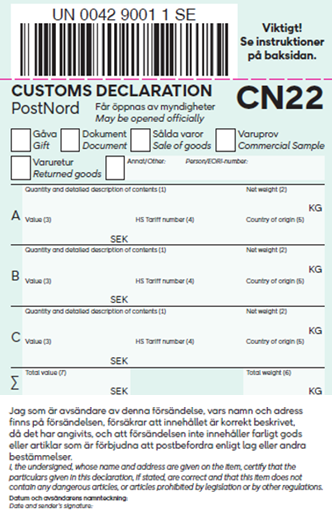
Instructions
- All information must be written in English or French, and the information must be clearly stated.
- State the reason for export.
- Enter the quantity and a clear description of the contents, for example, "two men's cotton shirts". Avoid general descriptions such as "Accessories" or "Merchandise". This facilitates customs clearance in the destination country and reduces the risk of the shipment being returned.
- State the weight of the goods in kg, for example, "0.45 kg".
- State the value of the goods in SEK, for example, "SEK 412".
- If the goods are exported for commercial purposes, state the customs tariff code (first 8 digits) and personal/EORI number. Otherwise, this field may be left blank.
- State the country of manufacture using the ISO country code, for example, "SE".
- State the shipment's total weight in kg.
- State the total value of all goods in the shipment in SEK.
You can order the document here on the website (page in Swedish) or pick it up from one of our Service points.
CN23
CN23 is a customs declaration for parcel services.
When you purchase postage via PostNord's website or app, you also complete the customs information digitally. You can then use the QR code to print the documents at a service point, or print the shipping label and customs declaration yourself. You then attach them to the parcel before handing it in at a service point.
If you are sending an item using Parcel Post International and wish to use a physical customs declaration, you can collect the form from one of our Service Points or order it on this website (page in Swedish). You can then purchase postage at a service point or affix stamps and receive assistance in attaching the customs declaration to the item.
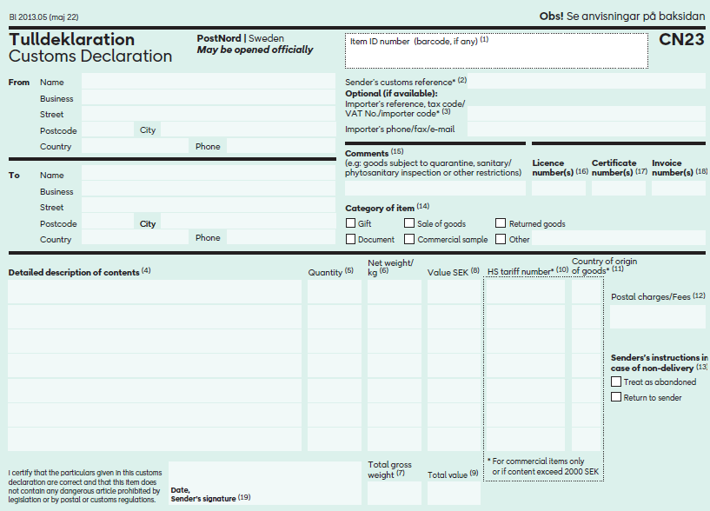
The instructions for completing the form are the same as for CN22.
NVIT (Norwegian goods in transit)
New requirements for exports to Norway
From 1 April 2026, new requirements apply for customs information when exporting to Norway for consignments sent as split shipments, multi‑parcel shipments, and for returns from Norway.
This means that you need to provide more detailed information about the contents of each parcel in the shipments.
Each parcel must, at a minimum, provide:
- a clear description of the contents
- the commodity code (HS code)
- weight (net and gross)
Until now, you have not needed to provide customs information for each parcel when sending shipments to and from Northern Norway. Shipments could still be sent, and in some cases, the information could be supplemented afterwards.
The Norwegian Customs authorities are now tightening the requirements. We recommend that you start providing this information in Customs EDI as soon as possible to avoid delays.
VOEC – Simplified VAT handling for E-commerce to Norway
VOEC (VAT On E-Commerce) is a Norwegian system that simplifies VAT handling for companies selling goods to Norwegian consumers, where each item is valued under NOK 3,000. By registering for VOEC, you can charge Norwegian VAT directly at the point of sale, allowing consumers to avoid unexpected fees later.
Benefits of VOEC:
- Faster deliveries: Goods are cleared digitally before crossing the border.
- Fewer charges for the recipient: Consumers’ don’t have to pay VAT or customs fees upon import.
- Simple administration: VAT is reported quarterly to Skatteetaten (the Norwegian Tax Administration).
What’s covered?
VOEC applies to sales of goods to consumers in Norway where each item is valued under NOK 3,000. It does not apply to food, alcohol, tobacco, or items with special import restrictions. As the sender, you are responsible for ensuring that the goods being shipped are permitted for import into the destination country.
To use VOEC, you must register your company with Skatteetaten in Norway and include your unique VOEC number when shipping your goods. For more information, please visit skatteetaten.no/VOEC.
PostNord offers VOEC through the following parcel services:
- PostNord Tracked Letter
- PostNord Untracked Letter
- International Parcel
- PostNord Service Point
- PostNord Parcel Locker
- PostNord Home
- PostNord Home Small
Want to learn more about how PostNord can support your deliveries to Norway?
Contact us – we’re happy to help.
Commercial invoice – documents for goods for sale
The commercial invoice is sufficient as a basis for PostNord, as the carrier, to enable us to create the export declaration. There must be at least two copies of the invoice written in English and usually signed by hand.
When exporting to Norway, no physical copies are required if the customs invoice has been submitted electronically.
The information that must be included is
- sender and recipient
- terms of delivery
- currency code
- invoice number
- price per goods item
- number of items and packaging code
- net/gross weight per goods item
- total gross weight
- article name
- country of origin
- product code/state number
- EOR number.
- Personal identity number, when the importer is a private individual.
Pro forma invoice – document for gifts, samples of goods, or documents
You use a pro forma invoice instead of a commercial invoice if the importer has not purchased the product, i.e., if the product is not for sale. There must be at least two copies of the invoice written in English and usually signed by hand. For exports to Norway, the invoice must be submitted electronically via PostNord Booking API, the Business Portal, or invoice.notify@postnord.com.
The reason for using the pro forma invoice must be stated on the pro forma invoice—for example, warranty goods, export of goods to the own office. The payment invoice is sent later – the value of the goods must be the same as stated in the payment invoice.
The invoice should state the following: “No charge. Value for customs purposes only.” Examples of goods include samples, gifts, promotional items, and returns.
Power of attorney for export using the Parcel and Pallet service
When exporting, it is the recipient that pays for import declarations, customs duties, and VAT when sending to certain destinations.
Some recipient countries require a power of attorney from the recipient, as a guarantee that the recipient is responsible for paying fees such as the import declaration fee, customs duty, and import VAT, before the parcel can be delivered.
As the sender, you can facilitate the fastest delivery possible by asking the recipient to fill in a power of attorney document in advance.
Download power of attorney document for recipients in Serbia and in Bosnia and Herzegovina (pdf)
Shipment list – a document that specifies the identities of the incoming parcels in a shipment
The shipment list shall accompany parcel no. 1, as a collective invoice is used. The list shall contain information about which incoming parcel numbers belong to the shipment, and the respective delivery address.
Summary of customs documents
The list below shows which documents to attach when using our services. More information is available in the terms and conditions regarding what applies to each particular service.
You can order the documents on this website or pick them up at one of our Service points.
International letters, PostNord Untracked letter, International Tracked Letter, and International Registered Mail
Regardless of value
Customs label CN22, date, and sender shall always be stated. EORI/personal ID number/VOEC* must be stated if the item is being sent for commercial purposes.
For shipments sent for commercial purposes, it is recommended that two copies of a Commercial Invoice be attached. For shipments not sent for commercial purposes (samples, gifts or returns), it is recommended that two copies of a Pro Forma Invoice be attached.
Value more than SEK 2,000
Customs declaration CN23 and commercial invoice. EORI/personal ID number/VOEC* shall always be stated. The personal ID number can be stated on the enclosed invoice/receipt instead of on the export declaration.
Please note: For exports to Norway, the VOEC number** must be stated regardless of the shipment value.
*CN22 is not mandatory for International Registered Mail, as these items may only contain documents. If CN22 is used, "Document" must be selected under "Category of item".
**VOEC number must be stated in cases where the selling company has registered a VAT account in Norway.
PostNord Service Point/Parcel Locker, MyPack PostNord Home, Pallet, Groupage and PostNord Parcel
For all goods values, shipping documents and two copies of a Commercial Invoice or Pro Forma Invoice are required. For exports to Norway, the invoice must be submitted electronically via PostNord Booking API, the Business Portal, or the MyCustoms service.
EMS International Express Mail, Parcel Post International, and International Parcel
Regardless of value
Customs Declaration CN23. Date and sender must always be stated. EORI number/personal ID number must be stated if the item is being sent for commercial purposes.
Value more than SEK 2,000
Customs Declaration CN23. EORI number/personal ID number/VOEC* must be stated if the item is being sent for commercial purposes.
For shipments sent for commercial purposes, it is recommended that two copies of a Commercial Invoice be attached. For shipments not sent for commercial purposes (samples, gifts or returns), it is recommended that two copies of a Pro Forma Invoice be attached.
Please note: For exports to Norway, a Commercial Invoice and VOEC* must be provided regardless of the shipment value.
*VOEC number must be stated in cases where the selling company has registered a VAT account in Norway.